10 Essential eSIM Tips Every Indian Traveler Must Know Before Flying to Dubai
Dubai is India's most visited international destination — over 2 million Indians travel there every year. But staying connected affordably is still a challenge most Indians get wrong. Here are 10 tips that will save you money, time, and stress on your next Dubai trip.
Tip 1 — Buy your eSIM before you leave India, not at Dubai airport
Dubai Airport (DXB) has Du and Etisalat counters selling tourist SIMs — but they cost more, require passport verification, and mean you land with no internet while you queue. Buy your Instant eSIM from India, install it at home on WiFi, and step off the plane already connected.
Tip 2 — Install eSIM on Indian WiFi, not at Dubai airport
eSIM installation requires a stable internet connection to download the carrier profile. If you try to install at the airport, you'll need WiFi to install the very thing that gives you data. Always install at home, 24 hours before departure.
⚠️ Common mistake: Many Indians buy the eSIM correctly but forget to install it before leaving. The QR code arrives by email — install it while you still have home WiFi. Screenshot your QR code as backup.
Tip 3 — Keep your Jio/Airtel number active for OTPs
In Dubai, you'll still need your Indian number for PhonePe, Google Pay, bank OTPs, and WhatsApp verification. eSIM runs as your second SIM — your Indian physical SIM stays active for calls and OTPs simultaneously. This is the single biggest advantage of eSIM over buying a local Dubai SIM at the airport.
Tip 4 — Choose the right data plan for your trip type
| Trip Type | Duration | Recommended Plan |
|---|---|---|
| Short trip / weekend | 1–4 days | 3GB |
| Tourism / shopping | 5–10 days | 5–10GB |
| Business / video calls | Any | 10GB+ |
Tip 5 — Set your eSIM as data SIM, Indian SIM as voice/SMS
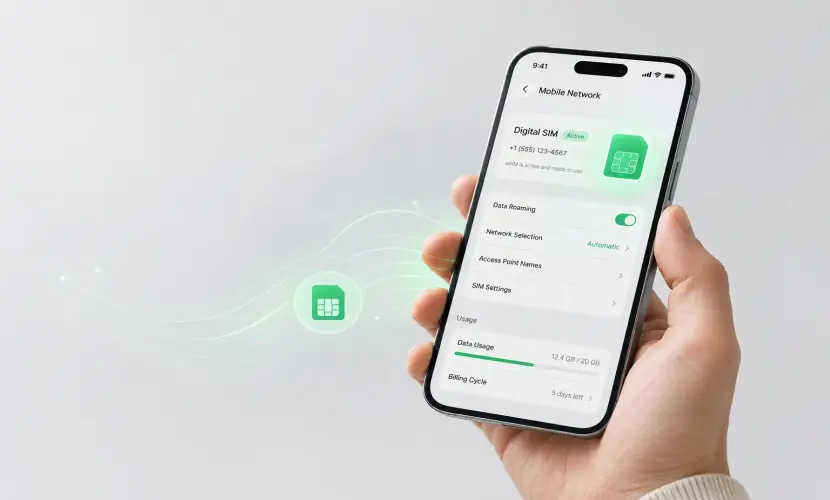
After installing your eSIM, go to Settings → Mobile Data and set your eSIM as the default data line. Set your Indian SIM as the default for calls and SMS. This way, all internet traffic flows through the cheap eSIM data, and your Indian number stays reachable for OTPs without roaming charges.
Tip 6 — Download offline maps before landing
Even with an eSIM, download Google Maps offline for Dubai before you board. Dubai's large malls and metro can have spotty indoor coverage. Offline maps work without internet and are a lifesaver inside Dubai Mall and the Dubai Metro.
- Open Google Maps → Search "Dubai" → Download area
- Download Dubai Metro map as PDF from the RTA website
- Save hotel address and key destinations as starred places
- Download Careem app before flying — avoid airport taxi overcharging
Tip 7 — Must-have apps to install before flying to Dubai
- Careem — Dubai's top ride-hailing app, cheaper than taxis. Link your Indian card before arriving.
- RTA Dubai — Official metro and bus app for real-time arrivals and Nol card top-ups.
- Wise — Best INR to AED exchange rate. Far better than airport forex counters.
- Noon / Amazon UAE — For online shopping during your stay in Dubai.
Tip 8 — UAE has strict internet laws — know what's blocked
🚫 Blocked in UAE: VoIP audio/video calls on WhatsApp, FaceTime, Google Meet, and Skype are restricted on UAE telecom networks. WhatsApp text messages and media work fine. For voice calls abroad, use your Indian SIM directly.
- ✓ WhatsApp text and media — works fine with Instant eSIM
- ✓ Instagram, YouTube, Google — all fully accessible
- ✓ Google Maps, Careem, banking apps — no restrictions
- ✗ WhatsApp / FaceTime voice and video calls — restricted on UAE carriers
Tip 9 — Save data with these smart habits in Dubai
- Use hotel and mall WiFi for heavy tasks — Dubai malls and hotels have excellent free WiFi. Save eSIM data for navigation and messaging.
- Turn off auto-play videos — Instagram Reels and YouTube Shorts auto-play can silently consume 500MB–1GB per hour. Disable in app settings.
- Enable Data Saver mode — Android: Settings → Network → Data Saver. iPhone: Settings → Mobile Data → Low Data Mode.
- Top up without changing SIM — Running low? Purchase additional data from instant-esim.com. No SIM swap or settings change needed.
Tip 10 — One UAE eSIM covers all 7 emirates
Many Indians visit Dubai but take day trips to Abu Dhabi (Sheikh Zayed Mosque, Ferrari World) or Sharjah. Your Instant eSIM UAE plan covers the entire country — all seven emirates under one plan. No extra SIM or top-up needed when you travel between Dubai, Abu Dhabi, and Sharjah.
Frequently Asked Questions
Can I use Google Pay or PhonePe for payments in Dubai?
Google Pay and PhonePe are India-specific and do not work for payments in Dubai. Use your Indian Visa/Mastercard debit or credit card — it works everywhere in Dubai. For currency exchange, the Wise app gives the best INR to AED rate.
Does Instant eSIM work in Abu Dhabi and Sharjah?
Yes. The UAE eSIM plan covers all seven emirates — Dubai, Abu Dhabi, Sharjah, Ajman, Ras Al Khaimah, Fujairah, and Umm Al Quwain. One plan, entire country, no extra charges.
Which is better — Instant eSIM or Du/Etisalat tourist SIM at Dubai airport?
Instant eSIM wins on price, convenience, and keeping your Indian number active for OTPs. Du and Etisalat tourist SIMs require passport verification at the counter, cost more, and replace your Indian number. The only advantage of a local SIM is if your phone doesn't support eSIM.
Is it safe to use banking apps and UPI in Dubai with eSIM?
Yes, completely safe. Instant eSIM uses standard encrypted carrier data. Your banking apps and net banking work normally. OTPs continue to arrive on your Indian Jio/Airtel number which stays active alongside your eSIM.
Ready to Explore Dubai — Stay Connected for Less
UAE eSIM plans from ₹499 · All 7 emirates covered · Buy with UPI from India
Get UAE eSIM Plan → Explore All Plans →