How to Avoid Roaming Charges Abroad with an eSIM (2026)
Few things ruin a great trip faster than getting home to a phone bill bigger than your flight. International roaming charges are notoriously expensive, and they add up fast while your phone quietly updates apps and backs up photos in the background. The good news: with a few simple settings and a travel eSIM, you can avoid roaming charges abroad almost entirely — and still stay fully connected the whole trip.
Here's exactly how to do it, step by step.
Why are roaming charges so expensive?
When you use your normal mobile plan in another country, your home carrier doesn't own the network there — it rents access from a local operator and passes that cost on to you, usually with a markup. Depending on your plan and destination, you might be charged a daily roaming pass, or billed per megabyte of data, per minute of calls, and per text message.
Pay-per-use data rates in particular can be eye-watering. And because data is consumed silently in the background, the bill often lands as an unwelcome surprise weeks after you're home. A travel eSIM removes that risk by letting you pay one fixed price up front.
eSIM vs roaming: a quick comparison
| What matters | Travel eSIM | Carrier roaming |
|---|---|---|
| How you pay | One fixed price, in advance | Per-use or daily pass, variable |
| Bill surprises | None — you know the cost | Common, often weeks later |
| Cost of data | Low | Typically high |
| Multi-country trips | Yes, with regional plans | Varies, usually pricey |
| Your phone number | Kept active on your home SIM | Same number, may incur charges |
| Setup | A few minutes online | Already on (that's the trap) |
How to avoid roaming charges abroad
Follow these seven steps and you'll keep your data bill flat — no nasty surprises:
- Use a travel eSIM. This is the single biggest fix. Buy a local or regional data plan for your destination and pay one fixed price instead of unpredictable roaming rates.
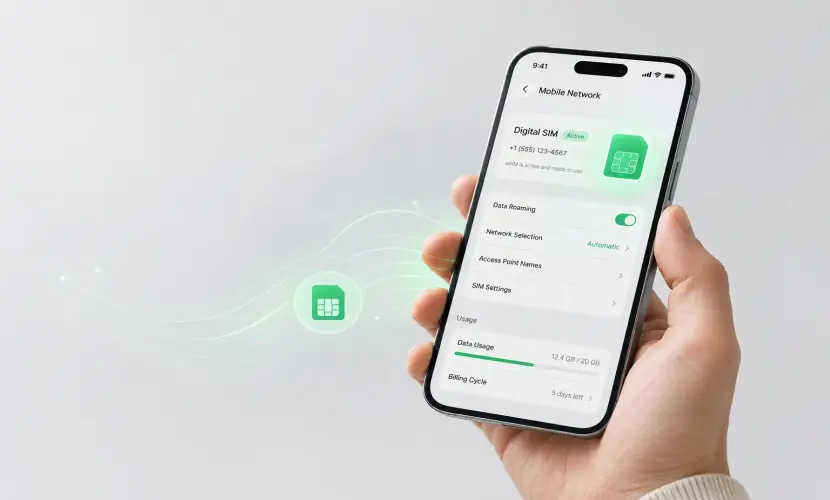
- Turn off Data Roaming on your home SIM. This stops your home carrier from charging you for data the moment you land. Your eSIM handles data instead.
- Stop background data drains. Disable automatic app updates, background app refresh, cloud photo/video backup, and auto-playing video. These are the hidden culprits behind huge bills.
- Use Wi-Fi wisely. Hotel and cafe Wi-Fi is great for big downloads, but avoid banking or sensitive logins on public networks, or use a reputable VPN.
- Download before you go. Save offline maps, boarding passes, playlists, and shows while you're still on home Wi-Fi.
- Call and text through apps. Use WhatsApp, iMessage, or FaceTime over your eSIM data instead of expensive roaming calls and SMS.
- Track your usage. Check your data usage in Settings so you can top up your eSIM before you run out — never after.
Quick tip: The most common mistake is leaving data roaming ON for your home SIM "just in case." Turn it off, let your eSIM carry the data, and your home carrier can't bill you for it.
Switch from roaming to an eSIM before you fly
Make the switch on home Wi-Fi a day or two before departure:
- Confirm your phone supports eSIM and is carrier-unlocked.
- Buy a data plan for your destination from Instant eSIM — you'll get a QR code by email.
- Install the eSIM by scanning the QR code. Need help? Follow our step-by-step eSIM setup guide.
- Before departure, turn off data roaming on your home SIM, set the eSIM as your data line, and enable roaming on the eSIM line only.
- Land already connected — with zero roaming surprises.
When does roaming still make sense?
To be fair, roaming isn't always the wrong choice. It can make sense if:
- Your existing plan already includes free or low-cost roaming for your destination.
- You only need a single quick call or text in an emergency.
- You're taking a very short trip with barely any data use and your carrier offers a flat daily pass.
Always check what your current plan already bundles before you travel. But for anything beyond light, short-term use, a travel eSIM almost always works out cheaper — and far more predictable.
Frequently asked questions
Does turning off data roaming stop all charges?
It stops data charges from your home carrier. However, if your physical SIM is still active, you could still be billed for incoming or outgoing calls and texts. Using an eSIM for data and apps for calling avoids this.
Will I still receive calls and texts on my usual number?
Yes, as long as your physical SIM stays in the phone — but sending or receiving them while roaming may incur charges. Many travelers rely on WhatsApp, iMessage, or FaceTime over their eSIM data instead.
Is an eSIM really cheaper than roaming?
For most trips, yes. You pay one fixed price for a set amount of data instead of unpredictable per-use roaming rates — so you always know the cost up front.
Can I still use WhatsApp and Google Maps without roaming?
Absolutely. They run on your eSIM data just like at home. Download offline maps before you travel to save even more data.
Do I need to remove my home SIM?
No. Just switch off its data and roaming, and use the eSIM as your data line. Switch everything back when you get home.
Travel connected, skip the roaming bill
Pick a plan for your destination, install it in minutes, and land online for one fixed price — no per-megabyte surprises.
Browse eSIM plans by destination →New to eSIMs? Start with Top 7 Reasons Travelers Are Switching to eSIM.